Documentation/Widget testing
Overview
Testing of both CTK widgets and application built on top of CTK could leverage the capabilities offered by the QtTesting library developed by Paraview folks.
How added the testing framework to CTK :
- Turn the variable CTK_USE_QTTESTING into ON.
If the option CTK_USE_QTTESTING is enabled, the build system will :
- Download external project QtTesting
- Compile the CTKQtTesting Library
- Including the class :
- ctkEventTranslaterPlayerWidget : Widget used by the Unit Test - Image
- ctkQtTestingUtility : Class used by the application - inherits from pqTestUtility
- ctkXMLEventObserver : Recover the Event and write the .xml file.
- ctkXMLEventSource : Read the .xml file and create the events.
- Including the class :
- For CTKWidget - CTKVisualizationWidget - CTKCoreWidget :
- Include the event translator and player required for custom widgets. (Located in the same folder as their associated widget sources)
- If BUILD_TESTING is enabled: widgets EventTranslatorTests will be compiled.
- These tests will use ctkEventTranslaterPlayerWidget and ensure that events associated with widgets can be properly recorded and played.
 Note:
Note:
Option CTK_USE_QTTESTING will be automatically enabled if BUILD_TESTING is ON
Adding the testing framework into your application
Adding the testing framework will allow users to recover script, but also a easy way to create tutorial or to test all the widget.
You can see the application exemple created in CTK to have an exemple:
How
Follow these steps to add this testing framework to your application.
- Create a variable ctkQtTestingUtiliy - can be added to your mainWindow class.
- And initialize this variable as following :
this->TestUtility = new ctkQtTestingUtility(this);
this->TestUtility->addEventObserver("xml", new ctkXMLEventObserver(this));
this->TestUtility->addEventSource("xml", new ctkXMLEventSource(this));
Note: You can have your own EventObserver and EventSource
- Create a button Record, and link it to the ctkQtTestUtility slot record
- Create a button Play, and link it to the ctkQtTestingUtility slot play
QObject::connect(Ui.RecordButton, SIGNAL(clicked(bool)), this, SLOT(record()));
QObject::connect(Ui.PlayBackButton, SIGNAL(clicked(bool)), this, SLOT(play()));
Limits
Note that there are still severals limits to this testing framework :
- The ctkVTKRenderView had to have the same size between the record and the playback.
- To solve the issue, ctkTestingUtility record all the application property - size, state, font ... - and before a playback, if these property are differents, ask the user if he wants to load the settings. Note: We are working on this limit to find a better solution.
- To solve the issue, ctkTestingUtility record all the application property - size, state, font ... - and before a playback, if these property are differents, ask the user if he wants to load the settings.
- All the CTK Widgets are not yet tested - Below the summary table -
Issues found on QtTesting
- QSpinBox/QDoubleSpinBox :
- A long click on the up/down arrow -> just one click even if the value change severals times.
- Fast click -> Double click -> no effect.
- clik on the up/down arrow just after editing the spin Box -> no effect.
Solve : Contribut to the QtTesting by modified the pqSpinBoxEventTranslator 
Here the link to my Github for the QSpinBox
Here the link to my Github for the QDoublSpinBox
- In pq3DView :
- The scroll button has no effect - Implemented for ctk.
- Shift between the current/Expected image.
Solve : new Implementation with the ctkVTKRenderViewEventTranslator and the ctkVTKRenderViewEventPlayer : 
- Change the normalization into a normalization by the widget center.
- Implemented the scroll action
- Add a better rounded when we cast from double to int to not have shift issue.
- QComboBox when it is editable :
- The hight-event "set_sting" crash if we edit the comboBox.
- Exemple : If we have an item "foo", we are going to edit the comboBox with "f", but the item "f" doesn't exist, and the player will crash.
- The hight-event "set_sting" crash if we edit the comboBox.
Solve : ... 
Building
Milestones
- Integrate QtTesting has an external projects

- Add unit test to all the widget - Below, the summuray table -
- Implement ctkEventTranslaterPlayerWidget
- Create custom translator/player if needed

- Implement widgets EventTranslatorTests
- Implement ctkEventTranslaterPlayerWidget
- Create an Application test - ctkQtTesting -
Player/Translators Widget Testing
Summury table, to know each widgets' state.
The state can be Done : , Done with QtTesting issue : , in progress : , or without unit test: .
|
|
Screenshots
-
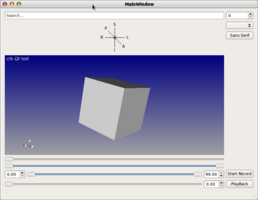 Simple application with recording / playing Qt testing capabilities
 -
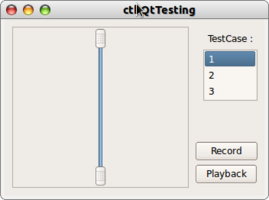 Little exemple of the widget testing


